How to suppress the controller pairing popup in your Vive Focus app
Today I want to propose you a quick solution for one big problem of the Vive Focus apps: the controller pairing popup always appearing in front of your eyes.
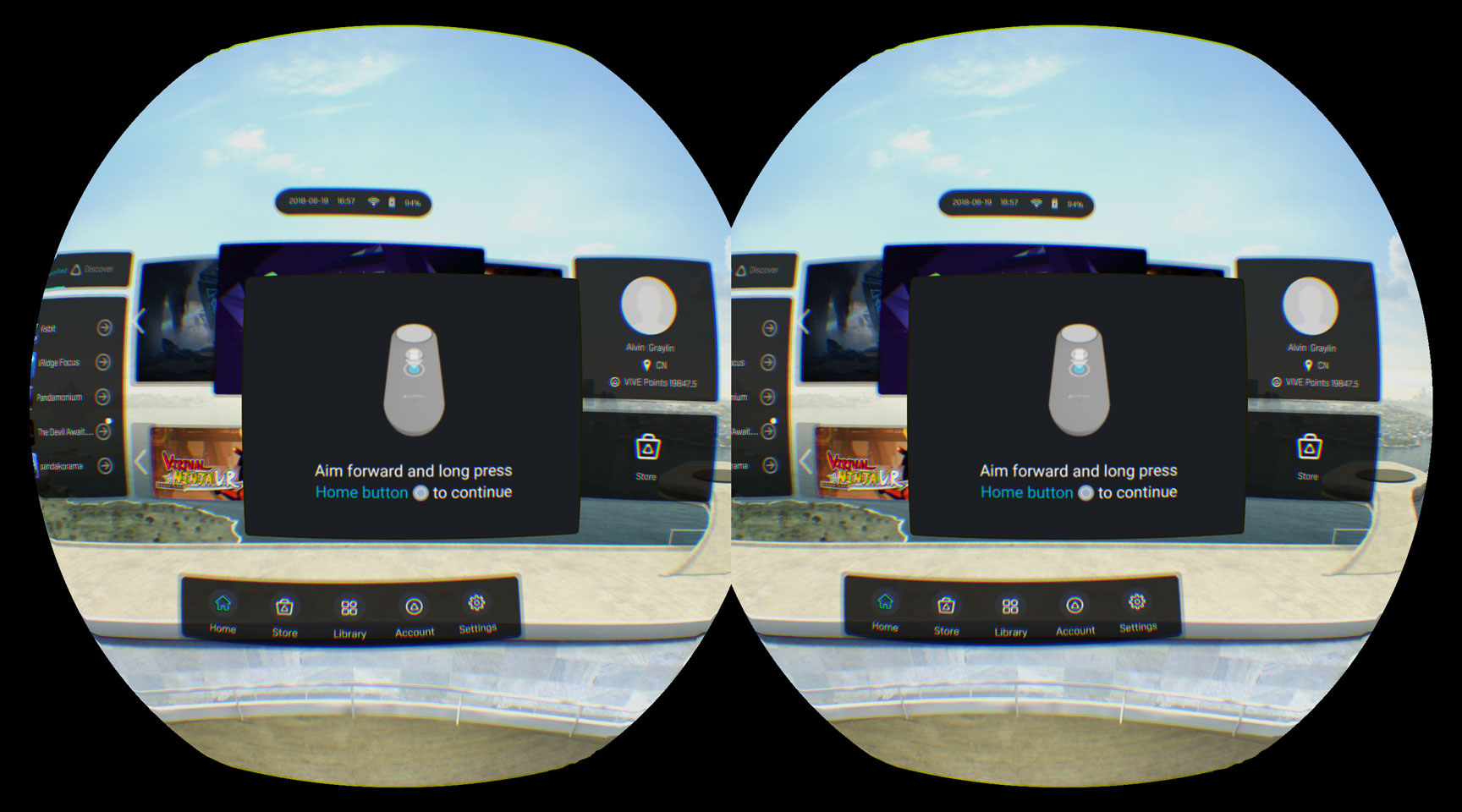
The situation is this one: you launch the experience you have just developed with the Vive Focus and when you put the headset on your head, you see an enormous popup asking you to pair the controller occluding almost all your visuals.
This popup is necessary because, as I have already explained in another post, before you can use the 3 DOF controller in a standalone headset, you have to perform its calibration, so that the controller and the headset have the same frame of reference. If you don’t do it, the controller becomes simply unusable, because there is no relation between what you are pointing at physically and what you are aiming virtually.
That’s why all standalone headsets (like Oculus Go and Lenovo Mirage Solo) do this same operation of the Focus.
But there are contexts where you would just want to suppress that warning: for instance you are debugging an app and you just want to give a quick glimpse of the modification you’ve just made; or your app is just a 360 video and so you don’t need any controller; or you are at an event and want just people to look at something without having to mess with a controller. What to do in these cases?
Well, thanks to the kind suggestion of the great Steven Tu (follow him!), now I have the solution and I want to share it with you.
You have just to add to the manifest of your app this simple line:
<meta-data android:name="no_controller_pairing" android:value="true" />
In Unity, this means opening the Manifest.xml of your Vive Wave experience and adding the above line in the position where there are the other meta-data lines. In case you don’t know, the Manifest.xml can be located in the Assets\Plugins\Android folder of your project. After the modification, mine looks like this one:

After this simple modification, when you re-build your app, you notice that when it starts, there is not that annoying popup anymore!
Anyway, no popup also means no controller. You can’t use your controller (not even its buttons) until you pair it by long pressing the system button. After you do that, the controller appears on screen and you can finally use it.
Cool, isn’t it?
I hope today’s post will be useful for all the Vive Wave developers out there… and if you are among them, please subscribe to my newsletter to read all my articles about the Vive Focus!
Disclaimer: this blog contains advertisement and affiliate links to sustain itself. If you click on an affiliate link, I'll be very happy because I'll earn a small commission on your purchase. You can find my boring full disclosure here.