EXCLUSIVE preview of KAT Walk C3 Ultra: a fun VR treadmill
I had the exclusive opportunity to review the KAT Walk C3 Ultra treadmill before its official announcement, and in this article, I’m going to share my impressions of it. It doesn’t happen every day to be the first person to receive a piece of hardware, so I really thank the team at KAT for giving me this opportunity.
[Double Disclaimer: KAT VR provided me a unit for this review. The unit provided is a preview one, so the commercial version may have some small differences from the one I’ve been able to try. Also, the software may have some improvements coming in the next few weeks]
KAT Walk C3 Ultra

KAT Walk C3 Ultra is a VR treadmill, that is a treadmill that lets you physically walk to walk in virtual reality. This device, when used with some special shoes, is able to detect when you are walking on the platform, and the movement is then replicated into the VR game you are playing by emulating the movement of the thumbstick. You are theoretically able to use this device with every VR game that supports smooth locomotion.
KAT VR is not new to these devices, and it is actually one of the world leaders in this field. The KAT Walk C3 Ultra is the latest device that innovates on the previous ones and tries to give the users the most realistic sensation of walking in virtual reality.
I’ll be honest: I have never been a huge fan of VR treadmills. And when the company told me it was “The first VR treadmill that does it all: most immersive, fully omnidirectional, longest-enduring,” I was like “yeah sure, the usual marketing claims”. But actually… as I’ll explain in this article, this was a pretty fun device to use. Let me explain why in this super-detailed (preview) review!
Logistics
I usually start my reviews with “Unboxing”, but the KAT Walk deserves a special section about the logistics.
After KAT VR and I decided to collaborate for this review, I provided them the address of my house. Then, a few weeks later, I got a phone call. I was expecting a call from my insurance company, so I thought it was them. Instead, the voice on the other side said something like “Hello, we are from the logistics dispatch center. We are going to deliver you a 70kg (154 pounds) pallet tomorrow. Is it fine for you?” I was like “WHAAAAAAAAAT”… in the beginning I didn’t realize it was the KAT… I had no idea what object weighing 70kg I should have received at home… a corpse? The “Son of Anton” AI ordering 70kg of meat for me?
Then I thought about it, and the only option of something heavy that I was waiting to receive was a KAT device. I felt relieved that it was not a corpse, but at the same time I thought: how the hell am I supposed to bring 70kg up to my floor?
I’m telling you this story to inform you that this device is big and heavy. You need some help to bring it up the stairs (thank God I have an elevator), and you need some space and strength to assemble it.
It also occupies something like 1.5m x 1.5m (5 feet x 5 feet) of space in your house. I had to move some tables and a carpet to put it in my house for this review. The only place I could find was in the middle of the living room: now, when I sit down on the sofa to watch TV, I watch the KAT Walk instead!
This is to say: consider all the logistics when buying this device. Everything is solvable: with some help, I managed to bring it home and assemble it. But be prepared.
Unboxing
The KAT Walk C3 Ultra wins the record for being the biggest (and heaviest) device I’ve ever unboxed. You can see the full unboxing here:
The device and the accessories were divided into four boxes. Two were pretty small, and two were pretty big. What surprised me the most during the unboxing procedure was that the device comes disassembled like a piece of furniture from IKEA. I thought the KAT Walk arrived with one big component being the platform, and another the harness, and I had just to assemble these two big pieces together. Instead, it is composed of many small pieces that all together become the treadmill. Even the concave platform is not only one piece, but it is like five, plus other ones to create the infrastructure for it.

I always like to comment on the “coolness” of the unboxing experience. I would say for this device the unboxing experience is very standard. The pieces are tidily put in the boxes with a lot of foam to protect them. The screws and all the little pieces are in some plastic bags. It is literally like unboxing a piece of IKEA furniture.
Keep in mind that you will need a lot of space to remove all the components from the boxes.
Assembling
I planned to assemble the big pieces of the treadmill in like 20 minutes. When I saw all the small parts that actually composed the device, the first thought was “Oh f*ck”. At the beginning of the assembly procedure, I looked a bit desperate, too, as you can see from the picture below.

As a matter of fact, once you understand how to read the instructions, assembling it is not difficult. And if you like a bit of DIY like me, you may even enjoy the experience. KAT provides in the box literally everything you need to assemble the device, including the screws, the screwdrivers, and even some spare screws in case you miss one. Then you can use either the instruction video or the paper instructions to assemble it.


I ended up using a combination of both, and I advise you to do the same. Pick a preferred method and then use the other as a fallback. I prefer reading (I have a blog, after all!), so I used the written instructions, but had a peek at the video when I was unsure about a step. In case you do like me, I suggest you use both the instruction papers together: one of them is a list of the various components with their name and a picture of them; while the other tells you how to assemble them. So usually you read the next instruction step on the second paper, then look up the names (e.g. “Extension bar”, “Back Part”) in the list of components on the first paper, and so you understand what pieces you actually have to pick up. Then you follow the small images and the text again in the second instruction paper to understand how to assemble them.
It took me around 1 and a half hours to assemble it. I needed a free space of around 2.5m x 2m (8.2 ft x 6.6 ft) to do the assembly procedure, because I needed the space for the treadmill, plus some free space on the floor to assemble some parts before putting them on the treadmill itself. It required some physical effort, and at a certain point I had to lift a part weighing 13kg (28 pounds). At the end, I was soaking in sweat, and I was very tired. But I did it! The treadmill was ready, and I was pretty satisfied with my work.

Setup
After the device was ready, I had to connect it to the power outlet. I was sent one with a Chinese plug, but I guess the official one will come with more international options. Then I had to plug a USB cable into my computer. Make sure you have the PC close enough to your KAT, or otherwise you’ll have to buy an extender cable.

After that, I had to run an installation program provided by KAT, called KAT Gateway. I had to create an account first. Then I started the “pairing” procedure, and the program automatically identified the treadmill. After that, I had to associate the sensors of the shoes, one after the other (this is very important: you have to connect one first, and then the other… I connected both together during the installation and made a mess). After that, the device is ready! I just had to put the just-paired sensors inside the soles of the shoes, and I was good to go.

The installation and configuration procedure is pretty quick and straightforward. And the good thing is that you do the configuration procedure just once. When you turn the system on again (even after a few days), you just have to turn it on, and it is good to go. You don’t have to re-associate the treadmill or remove the sensors from the shoes and pair them again, unless there are some problems.
Design
I pretty much like the manufacturing of the Kat Walk C3 Ultra. The device feels very solid. It is clearly well made, and the choice of the materials seems good, too. The rotating harness also rotates smoothly (there is almost no friction) and without emitting any noise. With its black color with light blue finishes, it fits well in a room with a tech-gaming style. It also has a white blue light on the bottom that makes it very beautiful at night.

I admit I imagined it to feel cheaper. Instead, it is a nice device. My only concern is that it is currently in my living room, where it doesn’t fit very well with the rest of the space. But that’s only because it is the only place in my house where I could fit it. If you have a gaming room, it can fit there very well.
I am actually pretty happy with the overall design of this device.
How does it work
Before actually delving into my impressions about it, let me tell you how the KAT is supposed to work. (If you are already aware of the functioning of a modern VR treadmill, feel free to skip this part)
Let’s start by giving you one straight fact: the big treadmill is just there to provide you a platform to walk. The actual walking detection happens in the shoes. To use this treadmill, you need some special shoes that are provided together with it. On the soles of the shoes, there is a hole where you put inside the sensors that are made to detect the movement speed. The floor of the treadmill has no sensor; the shoes are doing all the work.

When you wear the shoes and then go on the platform, you can start walking naturally (sort of, as we’ll see later), and the shoes will start detecting some movement. The shoes are paired to the platform via Bluetooth, send the data to it, and the platform gives it to the host computer via USB. The software on the computer uses some algorithm to detect if you are walking in some direction, and if so, sends the input to SteamVR. So if you walk forward, the system will send the current game you are playing a “smooth locomotion walk forward command”, which usually is the emulation of the thumbstick moved in the forward position. The treadmill also allows you to strafe laterally or move backwards, and these movements are all emulated as if you were moving in the game using the thumbsticks. Keep in mind that since you are emulating smooth locomotion, you need the game you are playing to allow for smooth locomotion. In some games, you need to keep the controllers in your hands so that the game can simulate you moving the thumbsticks. I remember trying to walk in games with teleporting set up or in some other games without holding the controllers in my hands, and nothing was working. So make sure you have set up your game correctly for smooth locomotion before using the KAT Walk.

Having covered the basics of walking detection, let’s go into more details. The first question you may have is how you can keep walking without moving forward. Well, this is easy to explain. The platform you walk on is concave and a bit slippery (there is also some oil on it), and the special shoes you have to wear have a wheel on the sole. So when you make a step forward, your foot goes on a part of the platform that has a downward slope towards the center. Thanks to the slippiness of the concave platform, gravity, and the wheel on the sole of the shoes, the foot starts sliding towards the center. So basically you try to walk naturally, but every step you make, the foot slides towards the center again. You end up walking in place by slipping on the concave floor. That’s why some people call these “slipmills” and not treadmills. In a fitness treadmill, you do an almost-natural walking movement, while here you walk-and-slip. It is not exactly the same thing.
Of course, slipping on a surface is not very safe, and since KAT doesn’t want its users to die, it provides a harness with some straps that you have to secure around your waist. Thanks to these very strong straps, you are safely attached to the device, and you don’t risk slipping to the floor. This “waist lock” keeps you safely attached to the machine, but it doesn’t prevent you from moving.
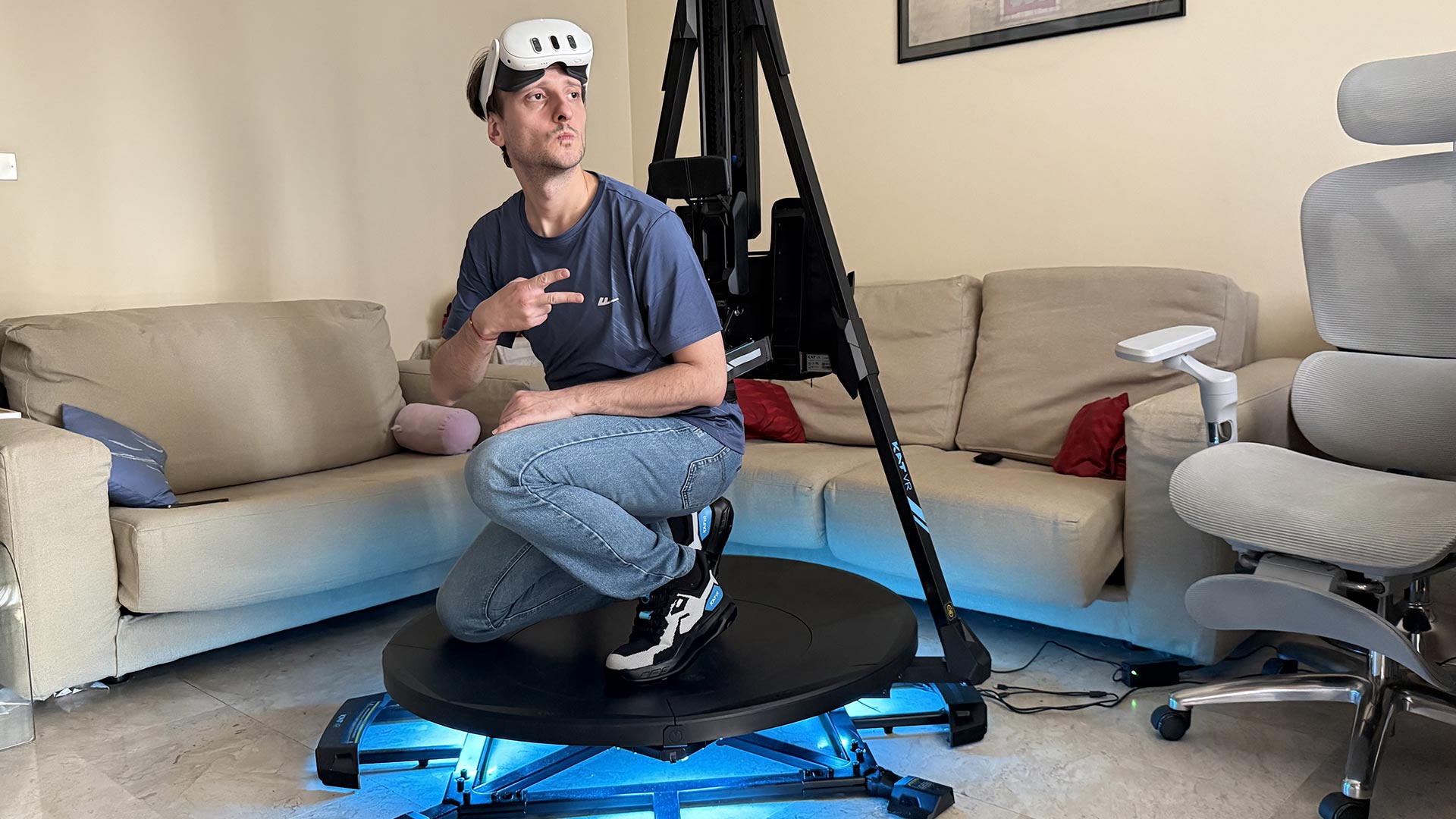
First of all, it is installed on a rail that allows you to go down and crouch or even to stand up and make a small jump.
To allow you to move in all directions, the waist harness is installed on a back part that can rotate around the concave platform, so when you rotate your body to change your walking direction, the whole back part (waist lock included) rotates with you, giving you full rotational freedom.
This smart system allows you to be safely strapped to the treadmill, but at the same time walk in all directions and even crouch.
Hands-on KAT Walk C3 Ultra: Onboarding
Having explained the theory, it is now time to talk about the practice. Entering the device is a bit of a tricky experience, and I think KAT has to work on improving it a bit. But to be honest, I’ve found no VR walking product that cracked the onboarding moment yet: when I tried the FreeAim shoes at AWE, I had very similar concerns, for instance.
The real problem is always in the shoes. You have to wear the special walking shoes before entering the device. But these shoes are made to be slippery, so once you have them on, you have to pray that you are not falling to the floor. To maximize my safety, I always put the shoes at maximum friction during this operation, so they are more manageable.
The shoes are super easy to wear and remove, thanks to the knob that allows you to tighten and loosen them pretty quickly.
Once you have them on, you have to grab some stable object (e.g., a chair, a desk, or the arm of another person) to avoid falling down and then put one of your feet at the center of the platform. Then you have to move also the other foot on the platform, being careful not to slip. If you are experienced enough, you should go on with your back already facing the back part of the device, so that you can carefully use the big straps to immediately attach your waist to the rotating back part. If instead you go on facing the back part, then you have to rotate yourself 180° while on the slippery platform, and this is not very safe.
Once you have secured yourself to the “waist lock,” you are safe, so you should do this operation as soon as you can. As I’ve said, the device is made very well, and also the waist lock is pretty tight and resistant. So once you are secured with it, you can feel safe that you are not falling to the floor anymore.
The big problem for me lies in the steps that you take to move towards the platform and the steps to go on the platform. I’ve never fallen to the floor, but a couple of times I risked it. I suggest you set the shoes at maximum friction and wear them on when you are already close to the platform, so as to minimize the steps you have to take with them. I also strongly suggest you have some object or person to grab while you are going on the platform. In case you don’t have anything, grab the rotating back part, which is better than nothing, but remember that it is made to smoothly rotate, so it can’t be a safe grabbing element.
I think KAT should work on providing more safety during onboarding. One suggestion could be to provide a lock for the rotating part, so that the user can safely grab it while going on the platform, and then unlock its rotation only after he/she has been safely secured to the machine.
Similar problems regard the offboarding. The first step when going off the platform can feel a bit risky. I repeat myself: I’ve never fallen to the floor, so this is manageable if you are used to experimental devices. But I would say that it is not for everyone.
Headset and cables
The ideal way to use the KAT Walk C3 Ultra is with SteamVR games connected in wireless mode, either with Virtual Desktop or Steam Link (or other equivalent solutions). This way you can play games with the high quality of PC VR, but with the freedom of movement of the wireless Quest. This is how I played most of the time.
You can also decide to go wired, and in this case, KAT provides in the box already a cable management system that makes the wire hang from above the headset. You must have, of course, a long cable (like the one Meta sells for the Quest), and thanks to this cable system, you can play your games without issues. I tried to make a crazy test and use a cabled connection without any cable management, and the result is that very quickly you start tangling the cable around your legs. So if you want to play wired without dying, you must use the cable management system.
The company also provided me with a device called the KAT NEXUS, which allows you to play standalone Quest games with the KAT VR. The KAT Nexus requires some additional setup, but then you have the full freedom of playing standalone games with the KAT. You still require a PC for the management of the treadmill, though. I wasn’t able to try this method because the Nexus requires the PC and its router to be in the same room, and I have them in different rooms.
At this point, you may have a question: if you play wirelessly, how can you go on the platform with the headset and the controllers, if you must be hands-free to grab something that can make you feel secure? Well, KAT found a simple but effective solution. There are two small hooks on the rotating back part. You can hang your headset and the straps of the controllers there.

Then you go on the platform, you secure yourself with the strap, and then you take back the headset and the controllers from the hinges, and you wear them. When you’re done playing, you put the headset and controllers back on the hinges, and you step down. It works fairly well.
Feet on: the walking sensation
I’ll say this very openly: working on the KAT Walk doesn’t feel like walking in the streets. The slippery movement is different than a normal walking movement. It is impossible that it feels the same. Plus, this special way of walking requires you to lean forward with your torso to compensate for the slipping of your feet. So it is a different posture with a slightly different walking movement.
You need to learn how to properly walk on it. This required me some time. In the end, I’ve found that for me the best pose is like leaning forward with my whole body, but while keeping the upper torso more straight up. If I walk this way, I can walk pretty decently in VR experiences. The walking sensation is not perfect, but it can do.

There are still a few problems. One is that I noticed that sometimes my feet don’t slip exactly backwards, but do a slightly circular movement. The other is that while walking straight is acceptable, walking backwards by rolling the shoe in the opposite direction, or strafing, doesn’t feel very natural.
But the biggest concern is that the rotation part, the one you are anchored to, has momentum. We are talking about a 13kg structure made of metal that has a very low rotation friction. If you do a very quick rotation and then you stop, the inertia makes the back part keep rotating, and it is only the mass of your body that stops it. It represented a problem in some experiences: every time I changed my walking direction, the momentum of the back part tried to make me keep turning, and this disturbed my walking action. Since it is heavy, it can create some imbalances, and a few times it happened that I had to stop walking because the momentum of this structure was making my body lose balance. We are not made to run while something heavy is trying to change our equilibrium. The more I used the treadmill, the more my body learned how to handle this swinging, but there were still moments in games where I had to change direction multiple times, and I had to stop because my legs started acting crazy.
Regarding safety, I always felt safe while walking. If you close the strap well enough, the machine is always going to support you. Even if you lean a lot, the strap never opens. This is a good thing: it means you are never falling to the floor while walking. I just suggest you close the straps tight, but not too tight. One day I closed them supertightly, squeezing my stomach, and after a while I started feeling nausea. My mistake. It never happened other times when I just closed them a bit tight.
Feet on: walking detection
The walking detection has a decent accuracy. Having worked on walking detection in my first startup, Immotionar, I know how hard it is. And I know that it is impossible to make it perfect.
I think most of the fun you can have is when you are playing a game where you mostly run in a certain direction. I tried a VRChat world where I had to just run straight and jump, and it was perfect. The walking speed detection, the direction of movement… everything was working as expected
The worst happens when you have to do some small, accurate movements. When I played Half-Life: Alyx, sometimes I wanted to do some small movements, like a small step in one direction, for which it would have been ideal to just perform a room-scale movement. But you can’t do room-scale when you are tied to the machine, so you need to slowly walk by calibrating the distance and walking direction, but this is hardly very accurate. When you have to do some small movements, I would say that not only the walking amount, but also the walking direction calculation is not really exact. The system understands the overall direction, but accuracy is not always as we hoped for. So you may have some frustration when trying to emulate room-scale.
As I’ve told you, the walking detection does its best when you keep walking at a decent pace.
Feet on: other movements
With this system, you can also walk laterally and backwards. The walking detection accuracy in these cases is definitely lower than the forward case.
You can also jump on the platform to jump in the game, and it kinda works if you allow it in the settings.
The movement I like the least to perform is crouching. The first time I tried to crouch in a game, I found myself with my a*s on the floor. The times I did that after, I’ve always felt unstable: remember that you wear two slippery shoes, and this is not ideal while crouching. I’ve improved my crouching tactics, and more often than not, I started putting one knee on the platform when crouching so that I have a stable pivot for my body.

To add insult to injury, sometimes the module attached to my waist locks when I try to stand up and doesn’t slip on its rail, so I’m crouched, but I don’t manage to stand up again.
In Half-Life: Alyx, I also found myself in a situation where I had to crouch and walk. Of course I couldn’t do that with this treadmill: even in real life, when you crouch and walk, you do a completely different movement than when you walk normally. So in this case, in a game, you have to press a button to virtually crouch and then walk on the Kat Walk C3 Ultra while standing. It’s an uncommon situation, but you should know about it.
As you may have understood, I was not a big fan of crouching on the Kat Walk. I have improved with it, but I still think it feels unsafe.
There is one last detail I want to add: the concave platform stays like 15-20cm from the floor. If you calibrate your SteamVR floor on your real floor and you try to grab some loot that is on the floor of the game, you won’t be able to grab it, because your hand can’t trespass the treadmill platform. This created a lot of problems for me when I was playing Gorn, and I was trying to grab the weapons on the floor. So I suggest you configure your SteamVR floor in an upper position 20cm above your real physical floor.
Sitting down
The rotating back part contains a little chair module: by rotating a small seat, you can have a cushion to sit down on.
I honestly didn’t like it much. I think it’s good if you want to have a quick break when doing your VR session. But it is pretty uncomfortable, because the harness forces you to sit down on the tip of it, so I wouldn’t stay seated there for long. And if you try to walk when seated, you will see that your feet end up on the edges of the concave floor, and so there is not enough space to perform the walking movement.
Ergonomics are very subjective, so your experience may be better. But mine was not the best.
Vibrations
The platform can also vibrate. Through the companion app on PC, you can choose when the vibrations should happen: it may be together with the walking detection, or together with the vibration of the controllers, and so on.
I honestly haven’t found the vibration of the platform much useful, since it is not so strong. It doesn’t give me the impression that I can feel the haptics of the real game terrain or something like that. Plus, it is very noisy, and the first time it activated, I thought the noise was the neighbor drilling his wall. I see it more as a nice-to-have than a must-have.
In the video below, you can hear the platform buzzing together with every detected step: it is quite noisy and doesn’t add much to the experience:
The software
The companion software on the PC, the KAT Gateway, contains a lot of options. For every game that you launch, you can modify some specific settings like the smoothing of the data, the detection sensitivity, the dominant hand, and the buzzing of the platform. You can also recalibrate the device. You can check the status of the battery of the sensors.

Then there are achievements and various missions related to fitness goals.
It is a bit rough around the edges, but it offers you a lot of customization options. In general, I think it is pretty good.

The shoes
I want to give you some more feedback about the shoes. I pretty much like them: they definitely have a nice design, cool colors, and they seem made with good quality, too. The knob to tighten and loosen them works super well, and I can put them on and off very quickly. I also had no discomfort while wearing them.

KAT also provided me with some special “fitness comfort insoles” that I could put inside my shoes for added comfort. In particular, these insoles are made so that to absorb better the shocks on the feet when running and jumping.


On the soles of the shoes, there are also some sliders that you can move to change the slipperiness of the soles. I tried them, and they work: they can also make a pretty big difference in how much you slide on the platform. Different slip factors create a different experience: when the shoes slide too easily, you can walk faster, but walking also becomes more frenetic, less precise, and feels a bit less safe. Having options is always good, and thanks to these sliders, having one can have the walking experience they prefer.
I think having some digital switch instead of physical sliders would be better, so I could dynamically change the slipperiness factor through the companion app while I’m already on the platform (make the shoes not slippery when outside the platform and slippery on the platform). Maybe this can be an improvement for one of the next models.
Talking about next models, I have to warn you that the pair I tested was a prototype, with lower friction that made me feel a bit unsafe. KAT VR told me that its friction differs from the mass-production version that has a much wider friction adjustment range: it can deliver higher friction, and lower friction settings are also available. I’ll share my review once I receive it.
The fitness station
KAT really thought about it with this treadmill. I’ve also been sent a “Fitness Station”, which is basically a water bottle holder to attach to the KAT Walk. This way, if you need to stay hydrated while running, you can. I thought it is really a nice touch.

All in all, it is a ton of fun
Every time I tried a VR treadmill in some event, I actually never understood why people should buy them: the sensation of walking is never realistic, it is tiresome, and the device is pretty bulky. When I started trying the Kat Walk C3 Ultra, I had the same sensation.
But then I started using it and my body slowly started getting used to walking on a slipping platform, adjusting to the momentum of the rotating part, and also finding a good posture to walk. And after a while, I actually started enjoying it.
I mostly played Gorn, Half-Life: Alyx, and a ton of VRChat worlds with it. At a certain point, walking on it became a sort of second nature. And it made the experience more realistic and more fun. I told you above about a VRChat world where you just have to run as fast as you can to escape a giant: the experience would have been super boring with a thumbstick, but it was incredible on the Kat Walk. The first time I used Gorn, I had some difficulties walking (and especially crouching), but the second time I was already running around the arena and slashing some heads.
When I am in some small rooms, like in some intimate VRChat Worlds or in Alyx, it is definitely less fun, because as I told you, in these contests, it would be better to just have a standard room-scale movement. But in open spaces, it is just liberating to run. I don’t know if it is because I like running and I like VR, but at a certain point, I just stopped thinking about the walking movement, and I started enjoying the experience. I just had fun.
I have to warn you that it is a fitness experience in itself: after half an hour playing Gorn with the Kat Walk C3 Ultra, I was soaking in sweat. Which can be a bad thing if you want to just sit down to relax and play, but it is a good thing if you actually don’t move much during the day and so some physical activity is good for you. Spending all my days in front of a computer, being able to run on the treadmill was actually good for my health. My suggestion for you is to use this device with fitness clothes on.

The weird thing is that after you play for one hour with this device, even when you step down, your body still feels like you’re running. You have some sort of phantom running sensation. And you want to go back on the KAT to have fun again.
Price and availability
Pricing & Editions
The KAT Walk C3 Ultra comes in two editions: Power Edition and Standard Edition. Both deliver the same core omnidirectional walking experience, with the sole difference being that the Power Edition includes built-in headset charging, allowing you to play without interruption.
Standard Edition: $1,499 (including shoes). With the Quest Adapter bundle: $1,598. Early-bird promo price: $1,199 (with Quest Adapter).
Power Edition: $1,699 (including shoes). With the Quest Adapter bundle: $1,798. Early-bird promo price: $1,359 (with Quest Adapter).
Shipping & Availability
You can preorder the KAT Walk C3 Ultra on the KAT VR website. Only 100 units are available for immediate shipping. All orders will be randomized within one week of purchase, à la Steam Frame. The first 100 selected orders will ship immediately; all remaining orders in the launch week are guaranteed to ship by mid-November.
Final impressions

The Kat Walk C3 Ultra is the first VR treadmill I have at home, and thanks to it, I’ve finally been able to understand why VR enthusiasts buy this type of product.
This is clearly a device for VR hardcore fans who want to upgrade their PCVR experience: it is bulky, quite expensive, and occupies a lot of space. The walking detection is acceptable, and safety needs some upgrades. It is not perfect, but it is also a device that can make your VR experience feel more natural and immersive, and in general, also more fun. And it can also be useful to make you stay fit at home.
It is not a device for the average consumer, but it is exactly the type of product that an enthusiast like me can buy. We are used to overcoming difficulties, tweaking settings, and also risking a bit of our lives when playing with VR. We don’t need something that works perfectly out of the box, but we can live some quirks in exchange for a more innovative and immersive experience.
Price is also surely not dedicated to consumers: $1,500 means it is a device for premium users. I honestly hoped it was a bit cheaper.
As an enthusiast, I have found a lot of things to be improved in the device, as you may have read in the above paragraphs. But at the end of the day, when paired with the right experience, I just enjoyed my time on the Kat Walk C3 Ultra. And probably this is the most important metric to consider.
Disclaimer: this blog contains advertisement and affiliate links to sustain itself. If you click on an affiliate link, I'll be very happy because I'll earn a small commission on your purchase. You can find my boring full disclosure here.